
Money Bank Free1.9 - Google Play
You'll be able to see results in few seconds.
Publisher Description
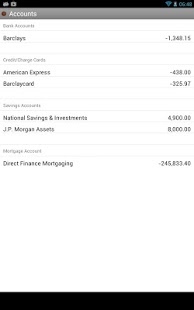
Keep track of your personal finances the easy way by importing data downloaded from your online accounts.
IMPORT/EXPORT
Import data from Microsoft Money, online banking, credit card accounts or anywhere that uses the standard Quicken (QIF) file format. The full (paid) version of this app can also import the newer Open Financial Exchange (OFX) file format.
CLOUD COPY
Use the companion app Cloud Copy for Google Drive Free also from vinlab.dev to easily move data between your PC and Android device.
MULTIPLE ACCOUNTS
Keep track of your bank account, credit card accounts, savings, investments, mortgage and more.
RECURRING TRANSACTIONS
Setup automated transactions or transfers between accounts.
SECURE
Includes password protection and full backup option to keep your data safe.
MADE IN THE UK
No currency symbols are used so this app is suited to any country. The date format can be chosen in the settings menu.
FREE VERSION
The free version has been populated with sample data but you can delete all this data and add your own. The free version is fully functional but cannot import OFX files and has no Restore function. If you purchase the full version you can backup all your data from this app and restore it into the full app.
Keywords: UK finance, current account, savings, investments, mortgage, US, Euro, financial data, money management
About Money Bank Free
The company that develops Money Bank Free is Vinlab.dev. The latest version released by its developer is 1.9.
To install Money Bank Free on your Android device, just click the green Continue To App button above to start the installation process. The app is listed on our website since 2014-03-27 and was downloaded 0 times. We have already checked if the download link is safe, however for your own protection we recommend that you scan the downloaded app with your antivirus. Your antivirus may detect the Money Bank Free as malware as malware if the download link to com.vinlab.moneybankfree is broken.
How to install Money Bank Free on your Android device:
- Click on the Continue To App button on our website. This will redirect you to Google Play.
- Once the Money Bank Free is shown in the Google Play listing of your Android device, you can start its download and installation. Tap on the Install button located below the search bar and to the right of the app icon.
- A pop-up window with the permissions required by Money Bank Free will be shown. Click on Accept to continue the process.
- Money Bank Free will be downloaded onto your device, displaying a progress. Once the download completes, the installation will start and you'll get a notification after the installation is finished.
Program Details
System requirements
Download information
Pricing
Version History
version 1.9
posted on 2014-03-27
v1.9 - Display a warning when QIF file contains multiple accounts,v1.8 - Fixed failure to import some QIF files,v1.7 - Fixed display of Net Worth on Accounts screen,v1.6 - Fixed problem with European localisation where decimal separator is a comma.,v1.5 - Bug fix release,v1.4 - Added ability to import OFX (Open Financial Exchange) files.,v1.3 - Added option to show net worth on accounts screen.,v1.2 - Fixed a rounding error and made a slight change to the archive function.
version 1.3
posted on 2013-04-25
Several fixes and updates
Disclaimer
Official Google Play Link
We do not host Money Bank Free on our servers. We did not scan it for viruses, adware, spyware or other type of malware. This app is hosted by Google and passed their terms and conditions to be listed there. We recommend caution when installing it.
The Google Play link for Money Bank Free is provided to you by apps112.com without any warranties, representations or guarantees of any kind, so access it at your own risk.
If you have questions regarding this particular app contact the publisher directly. For questions about the functionalities of apps112.com contact us.
